

Considerações de design
Este guia aborda a configuração de arquivos STL, erros comuns de malha e regras de projeto essenciais como espessura da parede, saliências e tolerâncias. Ele também fornece tabelas de projeto específicas para materiais para as tecnologias SLA, SLS, MJF e SLM - incluindo espessura mínima da parede, tamanhos de furos e necessidades de suporte - para ajudar a evitar falhas na impressão e otimizar a qualidade das peças.
Design-considerations
Inverted Normals
The normal vector is perpendicular to the surface at a given point. When normals are considered on closed surfaces, the inward-pointing normal (pointing towards the interior of the surface) and outward-pointing normal are usually distinguished.
Each triangle in the STL file should have a correct normal vector to define which side of the triangle faces outward. Usually, the normals of triangles on the same faces should all be inward or outward, leading the printer to add the material in the right way.
i.e.:
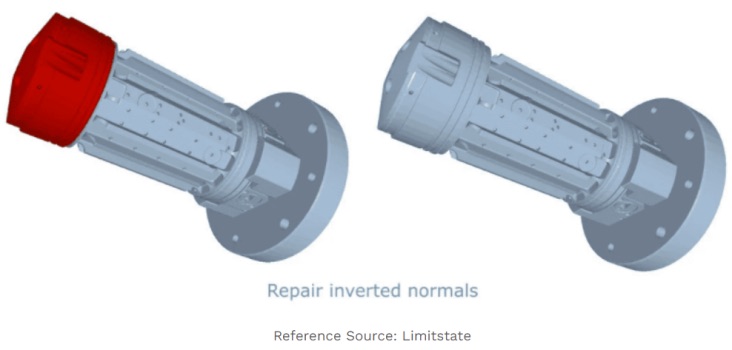
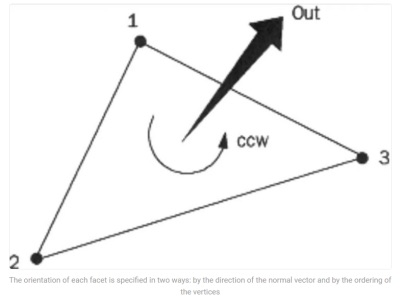
Solution:
Where the normals are facing the incorrect direction, they will need to be flipped.
Overall Recommendation
The best way to solve any issues with 3D models is definitely repairing the errors in the native CAD software before exporting them to STL. If it’s not an alternative, there are various kinds of STL repair tools, such as Netfabb, Meshmixer, 3D Builder, MakePrintable, etc.
3D Printing Key Design Considerations
There are some general design rules for 3D Printing that should be considered when designing the 3D models.
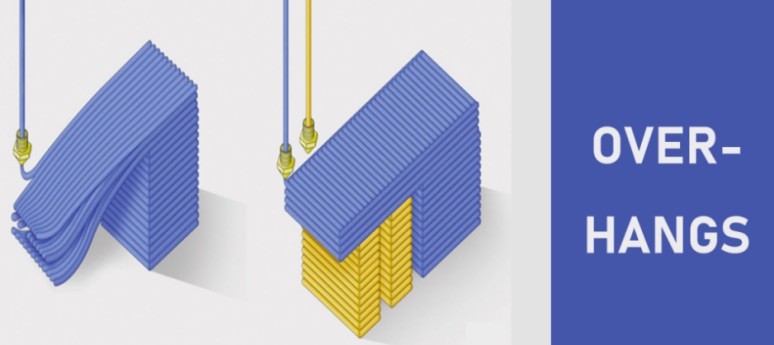
- Overhangs. Overhangs are geometric shapes in a 3D model that extends outwards and beyond the previous layer, and there has no direct support on it. The angle of overhangs should not be exceed 45°, which make sure that each successive layer has enough support on it. If the angle is at 45°, the 3D model can be printed well because every layer is in about 50% contact with the layer below it. If the angle is more than 45°, the model will be difficult to print because it is less stable and prone to curling, sagging or collapsing, which should consider support structures.
i.e.:
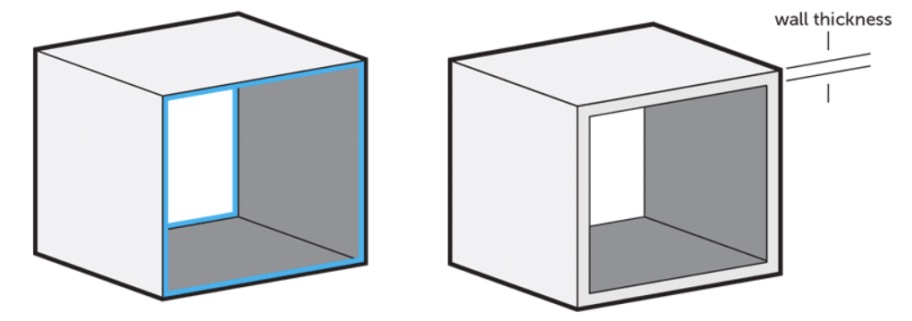
- Wall thickness. Wall thickness refers to the distance between one surface of your model and its opposite sheer surface. It is defined as the minimum thickness the model should have at any time. And every surface of your 3D model has been assigned a wall thickness. The minimum printable thickness primarily depends on the material you choose, while it may be affected by other factors such as the alignment, size, and overall design of 3D model can influence the minimum wall thickness. The wall thickness is greater than 0.8mm can be printed successful with most 3D Printing processes.
i.e.:
- Supported Wall. Walls that are connected to other walls on two or more sides. Minimum supported wall thickness varies from different materials and sizes, please check 3D Printing services rules in the following part to decide the value.

- Unsupported Wall. Unsupported walls are connected to other walls on fewer than two sides. Minimum unsupported wall thickness varies from different materials and sizes, please check the following 3D Printing services rules to decide the value.
